Using Azure Retail Pricing API for Product Planning
“Public Cloud providers’ online pricing calculators are so user friendly and easy to use that I love building a cost model for my product an enterprise SaaS” — Said NoOne
If you are building out a new SaaS service or planning to launch an existing service in a new geography it is most likely that among other things (services, features, latency compliance, and privacy) you would want to analyze the cost of hosting the SaaS service. Building out the cost model for a SaaS service may sound trivial but when you consider the price for different cloud services (compute, storage, databases network etc.), the variation of instance and tier types (archive, hot, cool, large, small etc.), different cloud regions, different cloud providers, and different savings plans (spot, on demand, and reserved etc.), it soon becomes unyielding.
If you go about building the cost model using the online calculator provided by cloud providers it soon becomes a grunt work project. These online calculator tools are fine for simple models but not user friendly for building out enterprise SaaS. If for some reason you have to build the model multiple times the grunt work and the time sink become unbearable. As someone who often works in building V1.0 of complex enterprise SaaS services from scratch, building out a cost model is foundational. I have had my fair share of building the cost model using online calculators. The unproductivity of this manual work made me think about automating it and building a configurable tool to model quickly, accurately, and repeatedly without manual effort. This was my driver for exploring the retail pricing APIs from Azure and then I thought I may not be the only one with this problem so why not share my learnings so someone else may find it useful? With that context let’s dive in.
Azure Retail Pricing API Overview
Azure Retail Rates Prices APIs provide a programmatic way to retrieve retail prices for all Azure services. People can now use these APIs to create tools for internal cost analysis and price comparison across SKUs and regions. Please keep in mind that these APIs are different from consumption or cost management APIs, using which an enterprise Azure customer can get price sheet, forecast, and usage details etc.
The good part is that these retail pricing APIs are not tied to a subscription, and therefore are not authenticated but if you are looking to build a tool for budget and spend tracking then please use cost management and consumption APIs to programmatically build that view.
✦ Learn More
If you want to learn more about these APIs check out these links for Azure documentation:
Let’s Dive Deeper — The Fun Stuff
Azure retail pricing APIs are easily filtered so you can fetch specific properties and the data you need.
Main Properties and Filters for API
I am sharing details of selected properties and filters I found most useful, for a full list of properties and filters please use the link above for detailed API specifications.
- Currency Code (
currencyCode) — Provides details of the currency. The default is USD but the API supports more than 15 of the most common currencies across the globe for example EUR, GBP, INR, JPY etc. - Retail Price (
retailPrice) — Provides the non discounted retail price. If your organization has an enterprise agreement with Azure and you want to know the price to you then please use the cost management and consumption APIs and not the retail APIs. Although I think retail pricing is still useful in some cases when you may want to compare the price of a service across different regions. The retail price will provide a directional comparable view of different regions which is a good proxy for what one can expect after the discount price in the enterprise agreement. - Region Name (
armRegionName) — Provides details of Azure Resource Manager region where the service is available for examplesouthcentralus. - Location (
location) — Provides details of Azure data center where the resource is deployed for example EU West. - Meter Name (
meterName) — The meter for billing. - Product Name (
productName) — Name of the product. - Service Name (
serviceName) — Name of the service. For example virtual machine etc. - Service Family (
serviceFamily) — Name of the service family. For example, compute. - Unit of Measure (
unitOfMeasure) — How the billing meter is measured. For example hour or GB etc. - Price Type (
priceType) — Provides details of meter consumption type. For example consumption or reservation.
Storage
Sample Program
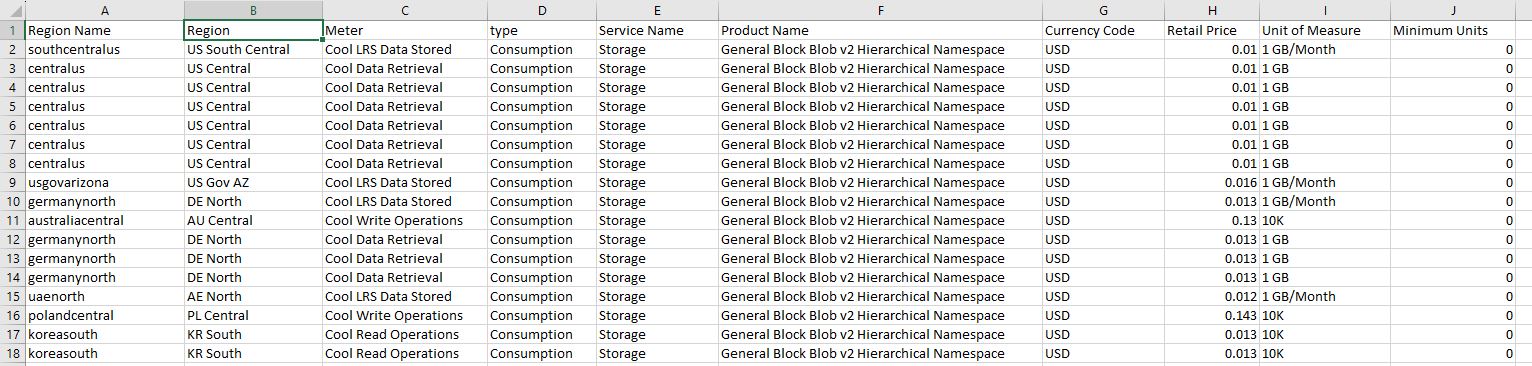
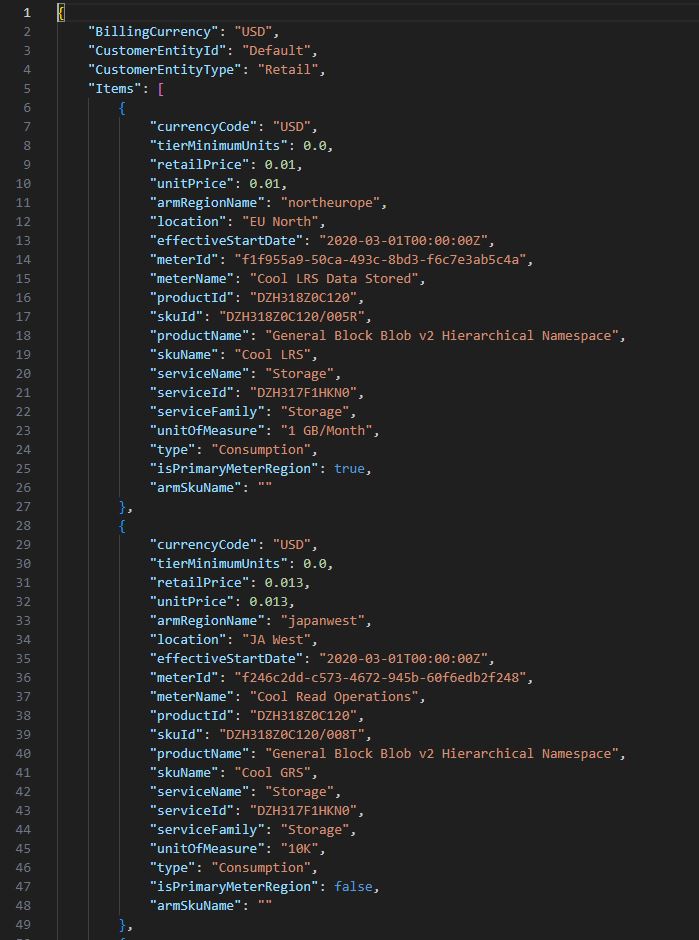
This program queries the Azure Retail Price APIs and fetches price details for data stored in Azure cool blob, write operations, read operations, and data retrieval across the globe and saves it as a csv and json file on the computer.
import requests
import json
from tabulate import tabulate
import pandas as pd
import os
import csv


def build_pricing_table(json_data, table_data):
    for item in json_data["Items"]:
        table_data.append(
            [
                item["armRegionName"],
                item["location"],
                item["meterName"],
                item["type"],
                item["serviceName"],
                item["productName"],
                item["currencyCode"],
                item["retailPrice"],
                item["unitOfMeasure"],
                item["tierMinimumUnits"],
            ]
        )


def main():
    table_data = []
    table_data.append(
        [
            "Region Name",
            "Region",
            "Meter",
            "type",
            "Service Name",
            "Product Name",
            "Currency Code",
            "Retail Price",
            "Unit of Measure",
            "Minimum Units",
        ]
    )

    api_url = (
        "https://prices.azure.com/api/retail/prices?api-version=2023-01-01-preview"
    )
    query = "productName eq 'General Block Blob v2 Hierarchical Namespace' and serviceName eq 'Storage' and (meterName eq 'Cool LRS Data Stored' or meterName eq 'Cool Write Operations' or meterName eq 'Cool Read Operations' or meterName eq 'Cool Data Retrieval')"
    response = requests.get(api_url, params={"$filter": query})
    json_data = json.loads(response.text)

    build_pricing_table(json_data, table_data)
    nextPage = json_data["NextPageLink"]

    while nextPage:
        response = requests.get(nextPage)
        json_data = json.loads(response.text)
        nextPage = json_data["NextPageLink"]
        build_pricing_table(json_data, table_data)

    # Print pricing data
    print(tabulate(table_data, headers="firstrow", tablefmt="psql"))

    # Set your file name to save the json to a csv file
    csvfilename = "AzureCoolBlobPrice.csv"
    jsonfilename = "AzureCoolBlobPrice.json"

    # Save the price list data in json format to a data frame
    with open(jsonfilename, "w", encoding="utf-8") as f:
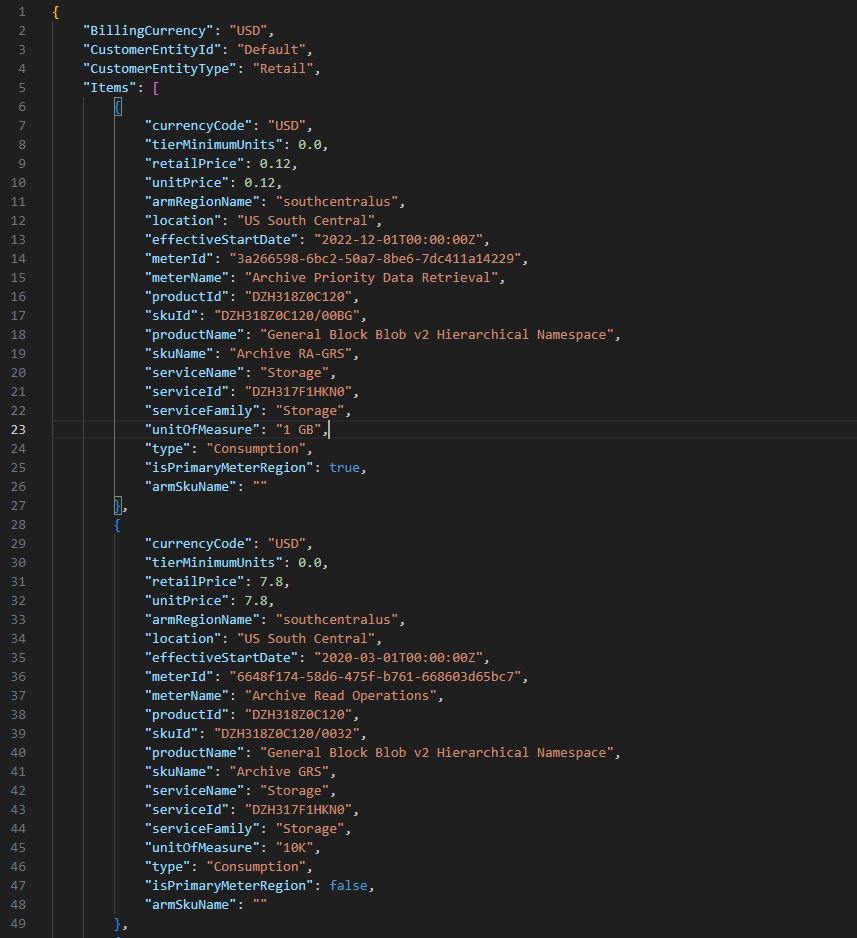
        json.dump(json_data, f, ensure_ascii=False, indent=4)

    # save the price list data in a csv file
    price_df = pd.DataFrame(table_data)
    price_df.to_csv(csvfilename, index=False, header=False)


if __name__ == "__main__":
    main()
Sample Response
Sample Program #2
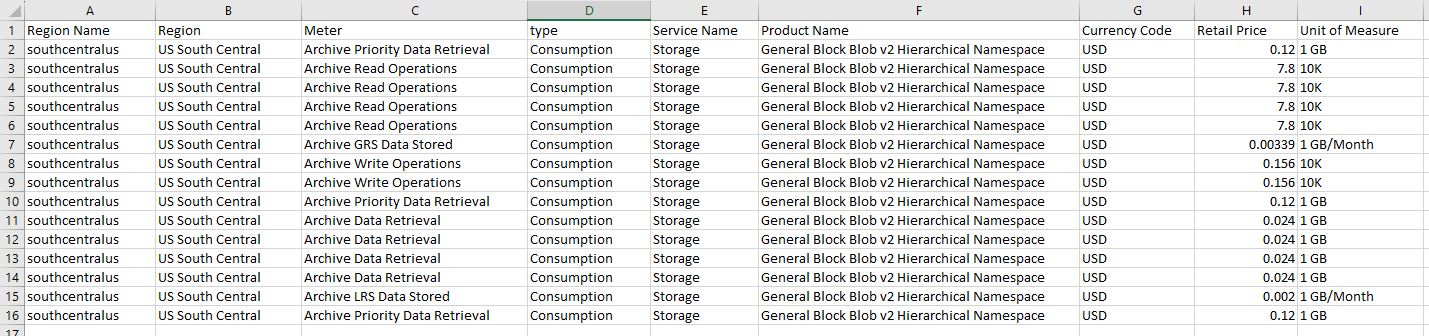
This program queries the Azure Retail Price APIs and fetches price details for data stored in Azure Archive blob, write operations, read operations, priority data retrieval and data retrieval for US South Central region and saves it is a csv and json file on the computer.
#!/usr/bin/env python3
import requests
import json
from tabulate import tabulate
import pandas as pd
import os
import csv


def build_pricing_table(json_data, table_data):
    for item in json_data["Items"]:
        table_data.append(
            [
                item["armRegionName"],
                item["location"],
                item["meterName"],
                item["type"],
                item["serviceName"],
                item["productName"],
                item["currencyCode"],
                item["retailPrice"],
                item["unitOfMeasure"],
            ]
        )


def main():
    table_data = []
    table_data.append(
        [
            "Region Name",
            "Region",
            "Meter",
            "type",
            "Service Name",
            "Product Name",
            "Currency Code",
            "Retail Price",
            "Unit of Measure",
        ]
    )

    api_url = (
        "https://prices.azure.com/api/retail/prices?api-version=2023-01-01-preview"
    )
    query = "armRegionName eq 'southcentralus' and productName eq 'General Block Blob v2 Hierarchical Namespace' and serviceName eq 'Storage' and (meterName eq 'Archive LRS Data Stored' or meterName eq 'Archive GRS Data Stored' or meterName eq 'Archive Read Operations' or meterName eq 'Archive Write Operations' or meterName eq 'Archive Data Retrieval' or meterName eq 'Archive Priority Data Retrieval')"
    response = requests.get(api_url, params={"$filter": query})
    json_data = json.loads(response.text)

    build_pricing_table(json_data, table_data)
    nextPage = json_data["NextPageLink"]

    while nextPage:
        response = requests.get(nextPage)
        json_data = json.loads(response.text)
        nextPage = json_data["NextPageLink"]
        build_pricing_table(json_data, table_data)

    # Print pricing data
    print(tabulate(table_data, headers="firstrow", tablefmt="psql"))

    # Set your file name to save the json to a csv file
    csvfilename = "AzureArchiveBlobPrice.csv"
    jsonfilename = "AzureArchiveBlobPrice.json"

    # Save the price list data in json format to a data frame
    with open(jsonfilename, "w", encoding="utf-8") as f:
        json.dump(json_data, f, ensure_ascii=False, indent=4)

    # save the price list data in a csv file
    price_df = pd.DataFrame(table_data)
    price_df.to_csv(csvfilename, index=False, header=False)


if __name__ == "__main__":
    main()
Sample Response
Compute
Sample Program
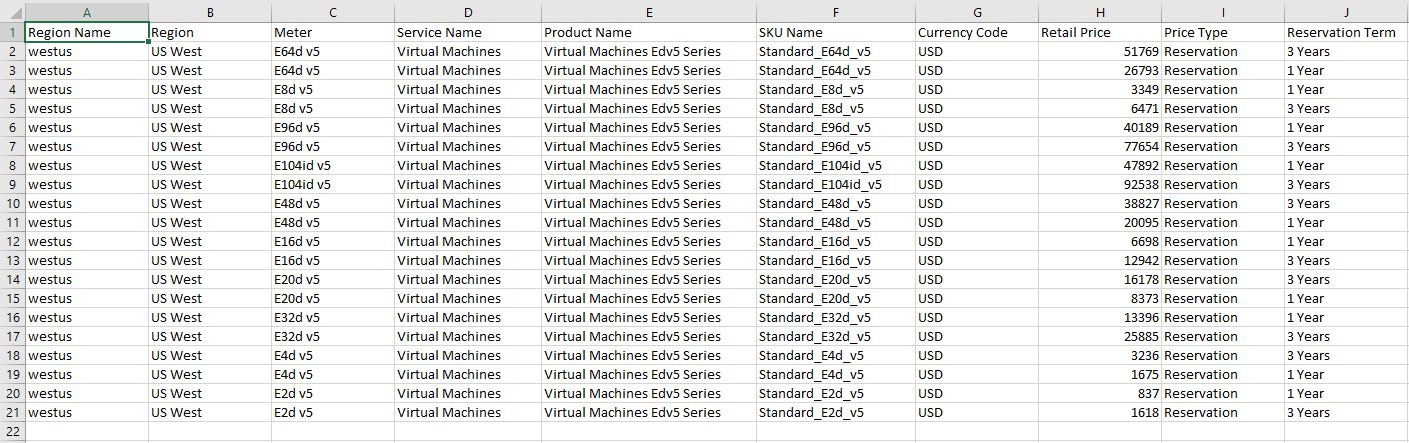
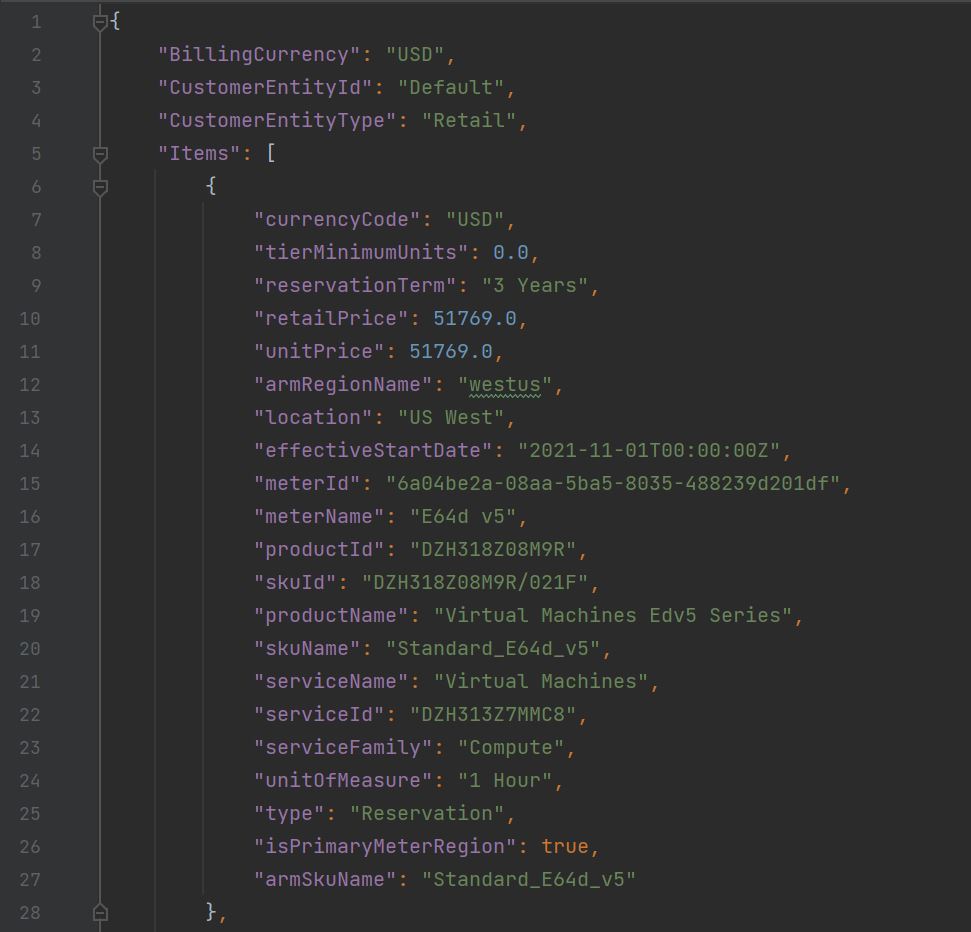
This program queries the Azure Retail Price APIs and fetches the price for reserved instance of Edv5 Series Azure VM in the US West region and saves it is a csv and json file on the computer.
#!/usr/bin/env python3
import requests
import json
from tabulate import tabulate
import pandas as pd
import os
import csv


def build_pricing_table(json_data, table_data):
    for item in json_data["Items"]:
        table_data.append(
            [
                item["armRegionName"],
                item["location"],
                item["meterName"],
                item["serviceName"],
                item["productName"],
                item["skuName"],
                item["currencyCode"],
                item["retailPrice"],
                item["type"],
                item["reservationTerm"],
            ]
        )


def main():
    table_data = []
    table_data.append(
        [
            "Region Name",
            "Region",
            "Meter",
            "Service Name",
            "Product Name",
            "SKU Name",
            "Currency Code",
            "Retail Price",
            "Price Type",
            "Reservation Term",
        ]
    )

    api_url = (
        "https://prices.azure.com/api/retail/prices?api-version=2023-01-01-preview"
    )
    query = "armRegionName eq 'westus' and serviceName eq 'Virtual Machines' and serviceFamily eq 'Compute' and productName eq 'Virtual Machines Edv5 Series' and priceType eq 'Reservation' "
    response = requests.get(api_url, params={"$filter": query})
    json_data = json.loads(response.text)

    build_pricing_table(json_data, table_data)
    nextPage = json_data["NextPageLink"]

    while nextPage:
        response = requests.get(nextPage)
        json_data = json.loads(response.text)
        nextPage = json_data["NextPageLink"]
        build_pricing_table(json_data, table_data)

    # Print pricing data
    print(tabulate(table_data, headers="firstrow", tablefmt="psql"))

    # Set your file name to save the json to a csv file
    csvfilename = "AzureComputePrice.csv"
    jsonfilename = "AzureComputePrice.json"

    # Save the price list data in json format to a data frame
    with open(jsonfilename, "w", encoding="utf-8") as f:
        json.dump(json_data, f, ensure_ascii=False, indent=4)

    # save the price list data in a csv file
    price_df = pd.DataFrame(table_data)
    price_df.to_csv(csvfilename, index=False, header=False)


if __name__ == "__main__":
    main()
Sample Response
Databases
Sample Program
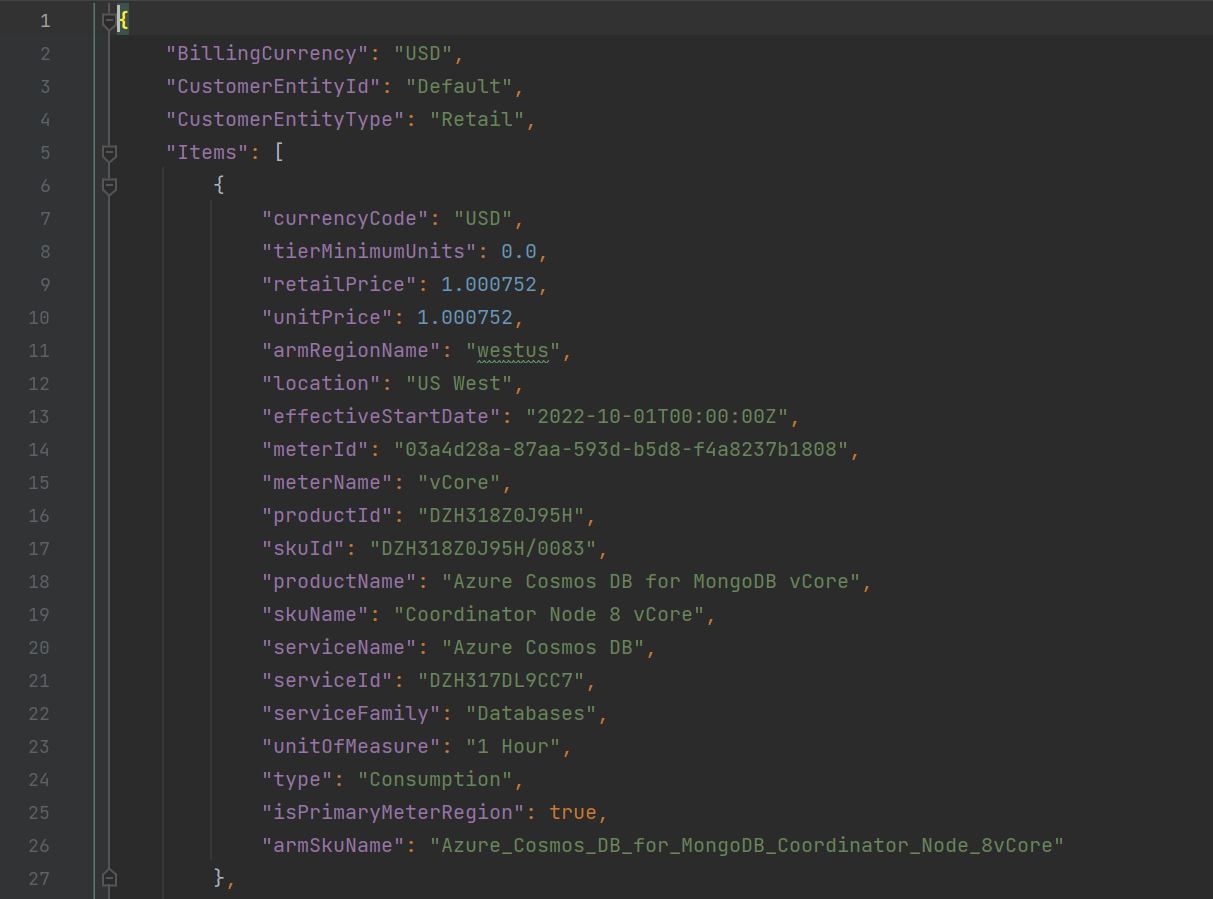
This program queries the Azure Retail Price APIs and fetches the price for services associated with Azure Cosmos DB in the US West region and saves it is a csv and json file on the computer.
#!/usr/bin/env python3
import requests
import json
from tabulate import tabulate
import pandas as pd
import os
import csv


def build_pricing_table(json_data, table_data):
    for item in json_data["Items"]:
        table_data.append(
            [
                item["armRegionName"],
                item["location"],
                item["meterName"],
                item["serviceName"],
                item["productName"],
                item["skuName"],
                item["currencyCode"],
                item["retailPrice"],
                item["unitOfMeasure"],
                item["type"],
            ]
        )


def main():
    table_data = []
    table_data.append(
        [
            "Region Name",
            "Region",
            "Meter",
            "Service Name",
            "Product Name",
            "SKU Name",
            "Currency Code",
            "Retail Price",
            "Unit of Measure",
            "Price Type",
        ]
    )

    api_url = (
        "https://prices.azure.com/api/retail/prices?api-version=2023-01-01-preview"
    )
    query = "armRegionName eq 'westus' and serviceFamily eq 'Databases' and serviceName eq 'Azure Cosmos DB'"
    response = requests.get(api_url, params={"$filter": query})
    json_data = json.loads(response.text)

    build_pricing_table(json_data, table_data)
    nextPage = json_data["NextPageLink"]

    while nextPage:
        response = requests.get(nextPage)
        json_data = json.loads(response.text)
        nextPage = json_data["NextPageLink"]
        build_pricing_table(json_data, table_data)

    # Print pricing data
    print(tabulate(table_data, headers="firstrow", tablefmt="psql"))

    # Set your file name to save the json to a csv file
    csvfilename = "AzureDBPrice.csv"
    jsonfilename = "AzureDBPrice.json"

    # Save the price list data in json format to a data frame
    with open(jsonfilename, "w", encoding="utf-8") as f:
        json.dump(json_data, f, ensure_ascii=False, indent=4)

    # save the price list data in a csv file
    price_df = pd.DataFrame(table_data)
    price_df.to_csv(csvfilename, index=False, header=False)


if __name__ == "__main__":
    main()
Sample Response

Closing Thoughts
In this blog, I shared the basics of two Azure Retail Prices API. This API can be used in a lot more interesting way (for example use response data to calculate overall cost, or do some other logical operations etc.), but I covered some of the most important foundational use, especially because once you have data in csv on computer you can do a lot of interesting things in excel as well. Below is how this API can help you:
✦ Selecting the Optimal Cloud Region
Let’s say your product or SaaS service is growing and you are thinking about hosting the service closer to your customers in different geographies such as Europe, or Asia, or Americas etc. apart from availability of services, features, latency, regulatory compliance, and data privacy you need to also consider cost. As cloud services are priced differently from one Region to another, this API provides a programmatic way to build a cost model to compare different regions.
✦ Estimated Cost Forecasting
Let’s say you are launching a new product and building a business case for it. Executive leaders in your organization will likely want to know ROI of the project, health of cash flow, and EBITDA margin. Building out the cost model using online pricing calculators can be complicated and tedious. Therefore these APIs can help you programmatically fetch the relevant information quickly and accurately and remove some of the grunt work associated with building the cost model.
✦ Retrieving Retail Pricing
Last but not the least fetching retail price is foundational use of these APIs. Whether you want to identify low-cost resource opportunities, or do estimation or build a model or do some other even more interesting thing is up to you.
I hope you found this blog useful. Amazon Web Services (AWS) and Google Cloud Platform (GCP) APIs are a little different but you can find the details in AWS API documentation and GCP API documentation respectively.